
Down to finalizing the content and the flow of how user should experience my installation.It might be like a story or chapters that they have to experience and participate in it.
1. Brief introduction of my concept.
2. User input their heartbeat to mark and form their existence in the digital world.
3. Movement 1: Wormhole - Dozens of other hearts floating around in the wormhole, waiting to be discovered.
4. Movement 2: Whisper - Get a insight on what others thinking, get to know them.
5. Movement 3: Connect - See how people connects with just one heartbeat away from each other.
6. Movement 4: Distance - Ask anyone to participate together in a conversation while detecting each other heartbeats, if the heartbeats value reach certain graph, it will trigger the light to blink.
Finalize flow:
1. Main menu
2. User input their heartbeats and key in their data
3. Movements:
Wormhole- I use the Internet metaphoric as a wormhole, a hypothetical tunnel bridges the web worlds and the real world. Instead of becoming the route of millions of data transferring, all the individual's digital heart representations floating in the wormhole, passing by each other, trying to leave their marking in the route.
Whisper- Here user can catch a glimpse on what others are thinking and feeling.It feels like the person is whispering their thoughts to you and here you can get to know the person a little bit more.
Weave- Here is like a human web. The system will sort out and display the 6 person that have the most similar heartbeats value to the user from the database. From the big pool of people from the wormhole narrow down to the specific individual for each person. (6 degree of separation)
I'm here- The final stage of the movement is the physical representation of the individual. I used LEDs matrix (as the rep)to show that a single normal daily thing (like lamp, leds table)can be intriguing too. I wan to show that if the user(from location A) click on the selected heart, it will trigger the leds to display pattern(at location B). The people at location B when they see the leds starting to bling, maybe they can sense the presence of someone being there even though they are at different location.
Showing posts with label Content Development. Show all posts
Showing posts with label Content Development. Show all posts
Saturday, April 10, 2010

Wednesday, December 9, 2009
Content Development #3 [Pachube to Arduino]
As promised, did another tutorial on how to use Pachube output to control Arduino. In this case, the brightness of the LED (in pin 9) will be determined by the realtime electricity demand/frequency in the UK. Every 5sec the data will be streaming in to the arduino. Before that here is the simple set up:
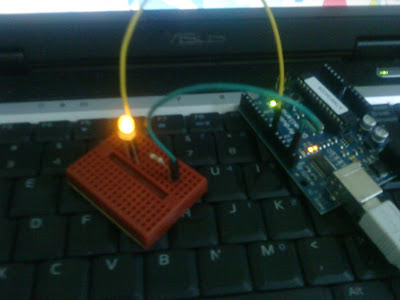
Make a simple circuit of LED(pin9) with transistor.

Open up your Processing and paste the code in.
Then the brightness of the LED can be control by the mouse-x value
in the grey window. (arrow there)

As i drag the mouse around, different value are detected and
the LED will blink accordingly. Higher, lower value. Lower, higher value.
After testing out and everything working fine, time to use Pachube output to control the LED:

The feed of UK realtime electricity supply.


As you can see from the Processing, it track the value right now
is 165. So the LED brightness is now the value of 165 too.
Now i change the output to frequency of the electricity:
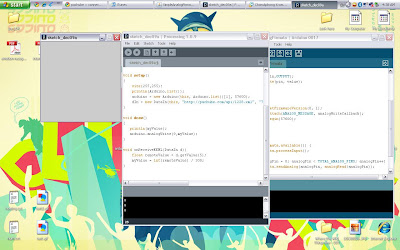
Frequency is much lower than the demand,
which is 40+.

So the LED light dim accordingly.
This is how real time data affect the physical space.
:)
*Probably need 2 Arduino board for my installation. One to input, another to output.
Tuesday, December 8, 2009
Content Development #3 [Arduino to Pachube]
Hello! I tried out the tutorial from Pachube on how to connect your Arduino to Pachube and using Arduino to create Pachube input. It took me 4 hours to trial and error and finally get to stream my data in the internet! I play with Processing, Arduino, Pachube and EEML.
First i set up Arduino with a simple circuit, light sensor that can detect light value of the environment.

Lightness detecting device!

I got the Arduino analogue sensor working but can't
get the Processing to retrieve the value from the sensor.
From the tutorial, it states that first upload the StandardFirmata to Arduino. I tried and tried and is not working anyhow. So i read back the book that Cheese gave, and found a similar coding which is the SimpleAnalogFirmata. And it works! This is the trick!

Finally after a looong struggling, finally got Processing
to trace the value! Right is Arduino/Left is Processing.
Check if the localhost can detect the data:

The light value of my room.

EEML. Extensive Environment Markup Language.
After everything finally working, time to feed it to Pachube! They need the ip address of our computer connection to feed the data. Well i am using wireless so i try to get a host but is not working. Instead i put the url of my IP address plus the port forwarding.

Data feeding in! This is my feed.

The bottom part with the graph shows
the quantitative value/data.
The lightness of my room. haha

The data collection is not instance i think or my connection is very slow.
Next, is a more exciting project. Using a Pachube output to control Arduino. Yesssh virtual/internet controlling the physical object/Arduino.
Do visit my "Light Up in My Room" to check out the if my room is dark or bright. Okay this is lame.
Goodnight fun world. Back to SRI.
Monday, December 7, 2009
Content Development #2 [I am in!]
Wootz! I am so excited! I just got the Pachube invitation code, my API key and full access to the site. I checked out the tutorial and I saw lots of coding going on in it..Apparently, i still need to study on Processing and PHP....
Currently i am downloading Processing, because Processing is needed to control my Arduino to process all the data formatting and serving to Pachube. Well if i have Arduino with Ethernet shield then my Arduino will be able to connect to the internet. So for now, Processing will do the trick.
Here is the sketch of how the flow of the installation:

My installation.
If this is possible.
I think i got the overall idea now, just need some eq and stuff to explore more.
&
62.9mb file(Processing) need around 2 hours to complete, but is almost 4am now. So I will continue on tomorrow (at least one of the tutorial) after the class and my google thingy.
Oh and sri report. :) Writing is entertaining...for now.
Saturday, December 5, 2009
Content Development #1
What my content should be?
Line for my installation:
Wormhole connects two different space, heartbeats generate the communicate pattern.
From bit to heartbeat. Every bit you send, light up someone's heart. A sense of presence.
* Did experimented with the Arduino but lacking some equipment(IR emitter etc) to proceed with the heart beat sensor testing.
As for the art piece:
I wanted to make the artpiece similar to this:
Arduino + PHP + Led RGB from Bruno Soares on Vimeo.
This which require php knowledge which i not familiar with at all. Then after searching in google looking for more references, i stumble upon Pachube. Pachube is a web service that allows us to store, share and discover realtime sensor, energy or real-time data from objects, devices or buildings. (Refer from Pachube) I think is a very cool platform to experiment more on how the exterior environment affects the data. & they have very good tutorials too.

Connect with datastream~
Image via Pachube.com
Since Pachube is still in beta-test, invitation code is needed to sign up. I am still waiting for my invitation code from the admin. Cross finger!
Subscribe to:
Posts (Atom)


 Posts
Posts


